How to Recover Suspended Google My Business Account & Fix Google Business Profile Suspension
Google My Business suspended? Learn the meaning of Google Business Profile suspension, why your Google business listing is suspended or disabled, and what happens when your Google business account is suspended on Google Maps. Understand Google business suspended due to quality issues, listing removal, profile disabled errors, and loss of visibility in local search results.


Google My Business Suspended: Meaning, Listing Suspension & Profile Disabled Issues.
Google Business profile suspended? Digital Entire helps businesses in Pune, Mumbai, and across India recover suspended Google My Business accounts and fix Google Business Profile suspension. Learn why your Google business listing is suspended, disabled, or removed from Google Maps, including issues like Google business suspended due to quality issues and profile disabled errors.
If your Google My Business suspended, google business profile suspended, or google business listing suspended issue appears, it means your business profile has been disabled by Google due to quality issues, policy violations, or incorrect business information. Many users search for how to recover suspended google my business, how to fix suspended google my business, or how to activate suspended account in google my business, especially when their google business account is suspended or google business page suspended.
Impact of Google Business Profile Suspension on Your Business
A Google Business Profile suspension can seriously affect your business performance:
- Loss of Online Visibility: Your business disappears from Google Search and Maps
- Drop in Leads & Calls: Customers cannot find or contact you
- Lower Local SEO Rankings: Competitors take your position in search results
- Reduced Customer Trust: Users may think your business is closed or inactive
- Business Growth Stops: Local traffic and inquiries reduce significantly
Google Business Profile Suspension Types: Soft Suspension vs Hard Suspension – Complete Guide to Google My Business Suspended Issues
When your Google My Business suspended issue occurs, it is important to understand the type of Google Business Profile suspension affecting your listing. Google mainly applies two types of suspensions: soft suspension and hard suspension. Knowing the difference helps you fix Google business account suspended, recover your listing, and restore your visibility on Google Maps and search results.
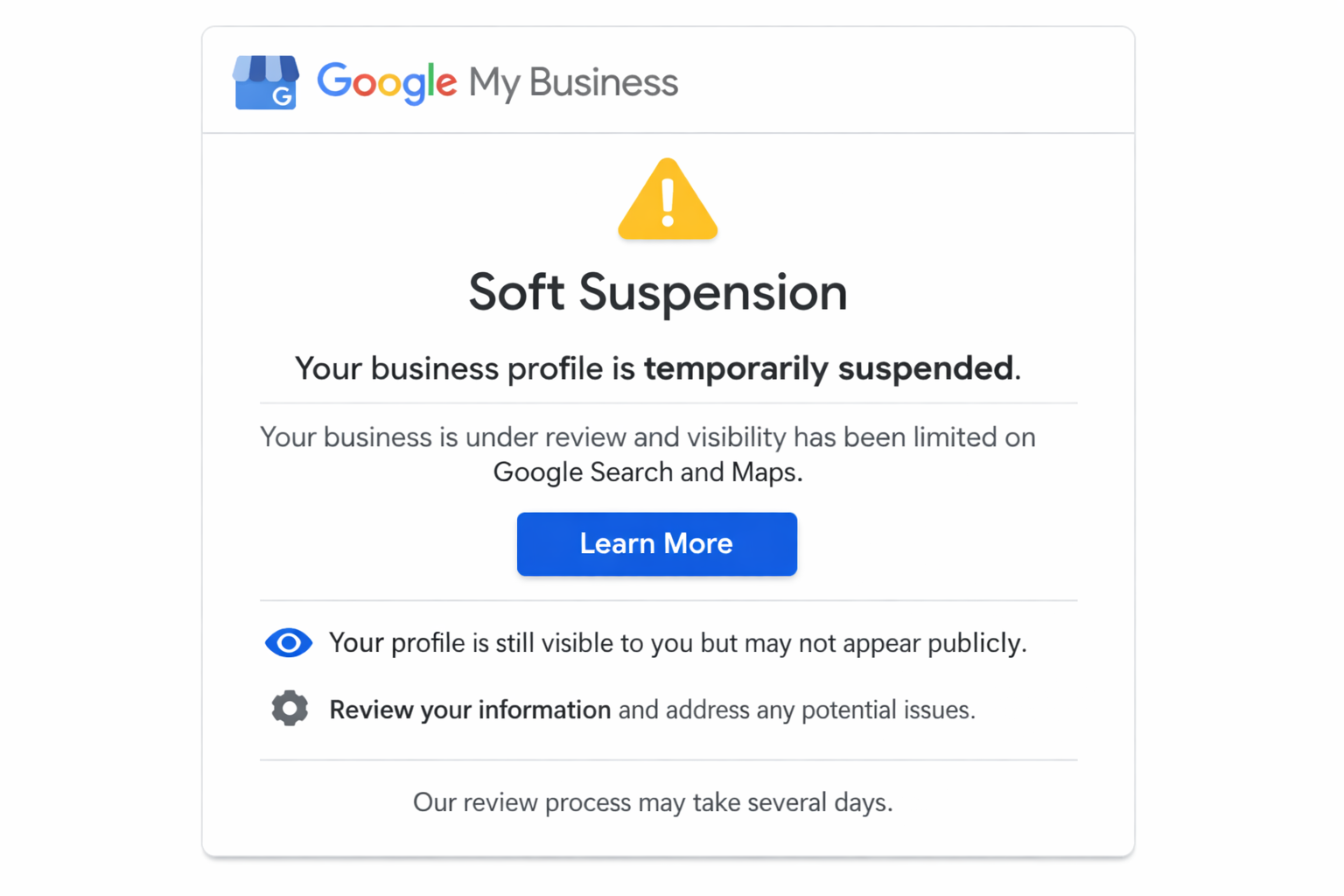
Soft Suspension in Google My Business
A soft suspension in Google My Business means your Google business profile is still visible on Google Maps and search, but your access is restricted. You cannot edit or manage your Google Business Profile, which affects updates, reviews, and business information.
This type of Google business listing suspended issue usually happens due to minor errors like incorrect details, frequent edits, or small guideline violations. It does not remove your listing, but it limits control and can impact your local SEO performance.
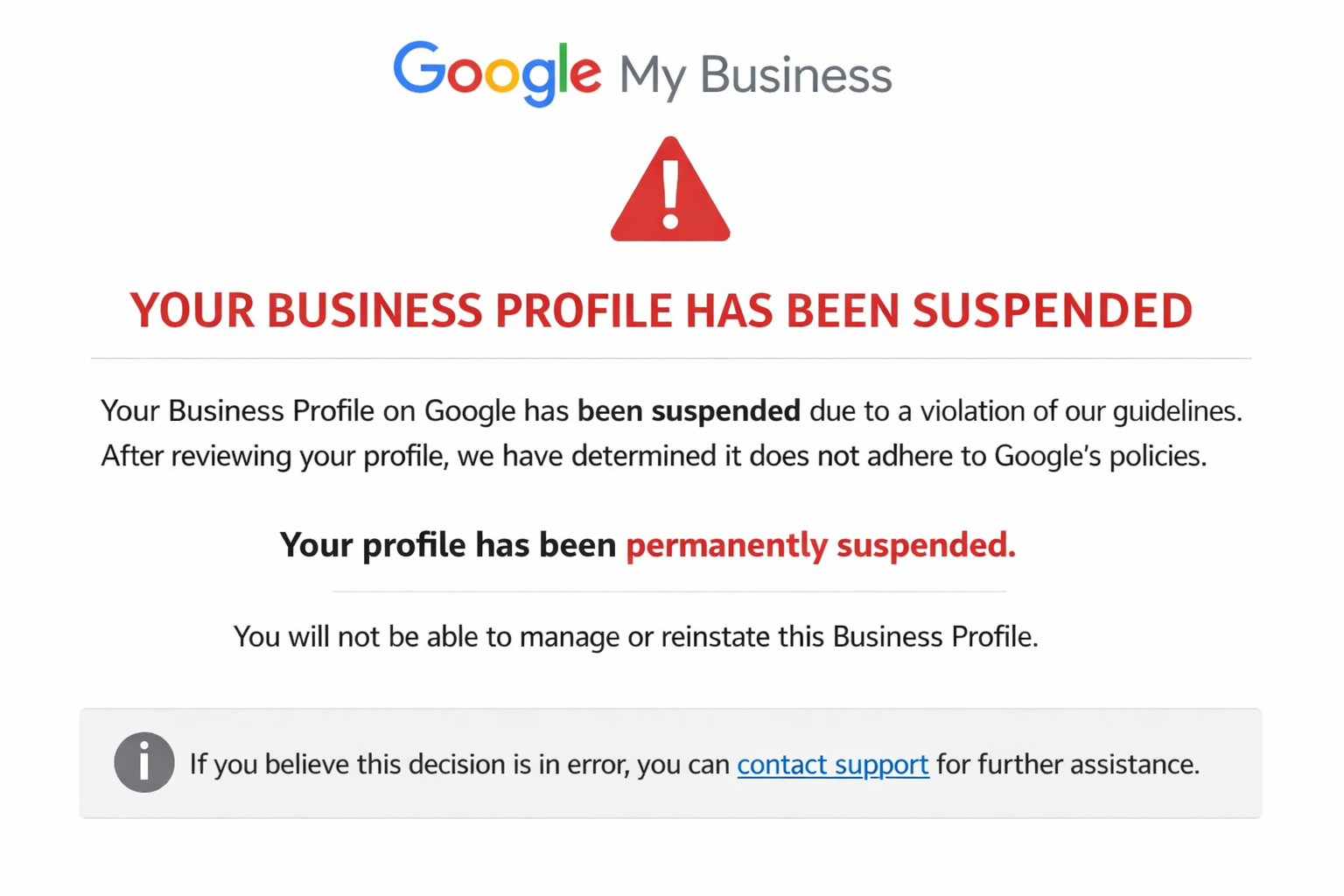
Hard Suspension in Google My Business
A hard suspension in Google My Business means your Google business listing is completely removed from Google Maps and search results. Your business becomes invisible, and customers cannot find your profile online.
This happens due to serious issues like Google business suspended due to quality issues, fake address, duplicate listings, or policy violations. A Google business account suspended under hard suspension requires proper fixes and reinstatement to recover visibility and rankings.
Google My Business Suspended: Soft vs Hard Suspension Comparison
| Factor | Soft Suspension (Google Business Profile Suspended) | Hard Suspension (Google My Business Suspended Account) |
|---|---|---|
| Visibility on Google Maps | Google business listing visible on Google Maps and Google Search | Google business listing suspended and removed from Google Maps and search results |
| Google Business Profile Access | Google Business Profile access restricted, cannot manage or edit listing | Google business account suspended and fully disabled |
| Impact on Local SEO | Medium impact on local SEO ranking and Google Maps visibility | High impact with complete loss of Google business visibility, ranking, and leads |
| Reasons for Suspension | Minor issues like incorrect business details, frequent edits, NAP inconsistency | Major violations like fake address, duplicate listings, policy violations, quality issues |
| Recovery Process | Easy to fix Google Business Profile suspension with small corrections | Difficult to recover suspended Google My Business account, requires reinstatement form |
1. Google Business Suspended Due to Quality Issues (Low Trust Signals)
This is the most common reason for Google My Business suspended or Google Business Profile suspended issues. If your listing looks incomplete, misleading, or low-quality, Google may disable it automatically.
Common triggers:
- Incomplete Google Business Profile (no photos, no description, no services)
- No proper website or low-quality landing page
- Mismatch between website and Google business listing
- Low trust signals or suspicious activity
This often results in Google business profile disabled, google listing suspended, or GBP suspension due to quality issues, affecting your Google Maps visibility and local SEO ranking.
2. Incorrect Business Information (NAP Consistency Issues)
Your Name, Address, Phone Number (NAP) must be consistent across all platforms. Any mismatch can lead to Google business listing suspended.
Examples:
- Different address on website vs Google listing
- Wrong or inactive phone number
- Fake or outdated business details
This impacts Google Maps ranking, local SEO optimization, and may trigger Google Business Profile suspension errors.
3. Keyword Stuffing in Business Name (Spam Violation)
Adding extra keywords like:
“Best Digital Marketing Company Pune SEO Services”
instead of your real business name can cause Google My Business account suspended issues. Google strictly checks spammy names, and this is a major reason for Google business listing suspended due to policy violation.
4. Fake Address, Virtual Office & Location Issues
Using:
- Virtual office address
- Co-working space without proper signage
- Fake or unverifiable location
can lead to Google business profile suspended due to address verification issues.
Google requires a real physical location for Google Maps listing verification, and failure to meet this can affect your local SEO and Google Maps presence.
5. Duplicate Listings (Multiple GBP Profiles)
Creating multiple listings for the same business leads to:
- Duplicate content
- Confusion in Google search results
- Spam signals
This results in Google business listing suspended or disabled and can harm your Google Maps ranking and business credibility.
6. Frequent Changes in Business Details
Too many updates in:
- Business name
- Address
- Category
can trigger Google business suspended errors.
Frequent edits may look like manipulation, causing Google Business Profile suspension and reducing trust signals for local SEO.
7. Violation of Google Business Profile Guidelines
Not following Google policies can cause immediate suspension.
Violations include:
- Misleading services or false claims
- Restricted or prohibited categories
- Fake information or duplicate content
- Policy-breaking or spam content
This can result in Google business account suspended permanently or temporarily, affecting your Google search visibility and leads.
8. Google Business Profile Not Verified Properly
If your Google Business Profile verification fails, your listing may be:
- Disabled
- Suspended
- Not visible on Google Maps
Verification is essential for Google Maps listing approval, local SEO ranking, and business trust.
9. Fake Reviews, Spam Activity & User Reports
Google monitors:
- Fake reviews
- Review manipulation
- Sudden increase in ratings
These actions trigger Google business suspended due to spam activity, which negatively affects your Google business profile ranking, visibility, and credibility.
10. Website Issues Affecting Google Business Profile (GBP)
Your website must match your Google Business Profile listing.
Problems include:
- Website not working or inactive
- Mismatch in business details
- Low-quality or spammy content
This can lead to Google business listing suspended due to quality issues and reduce your local SEO performance.
11. Category & Service Area Mistakes
Choosing the wrong:
- Business category
- Service area
can confuse Google algorithms and result in Google business profile suspended errors. Correct category selection is important for Google Maps ranking and local SEO optimization.
12. Suspicious Account Activity & Security Issues
- Multiple logins from different locations
- Frequent ownership changes
- Unauthorized access
can trigger Google business account suspended due to security concerns. Google prioritizes security to protect users and maintain platform trust.
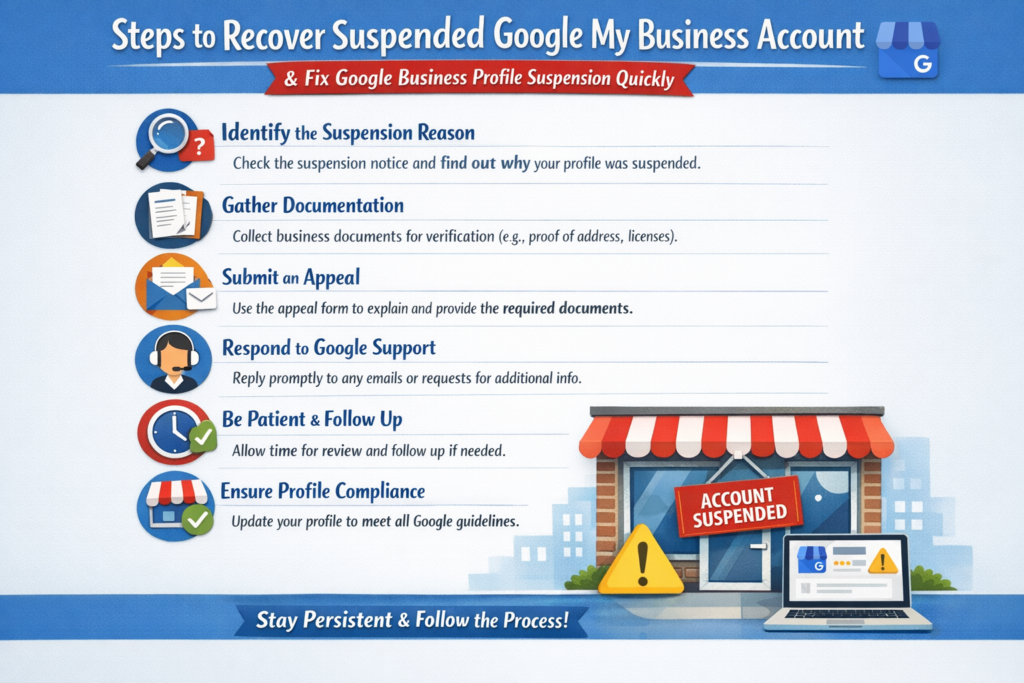
Steps to Recover Suspended Google My Business Account & Fix Google Business Profile Suspension Quickly
Step 1: Identify the Reason for Google Business Profile Suspension
Start by analyzing why your Google My Business suspended, Google Business Profile suspended, or Google business listing suspended issue occurred. Common reasons include google business suspended due to quality issues, policy violations, incorrect business information, fake address, duplicate listings, or spam signals. Identifying the root cause is essential to recover suspended Google business account and restore your Google Maps listing visibility.
Step 2: Fix All Errors in Your Google Business Profile (GBP)
Update your Google Business Profile (GBP) with accurate and complete information. Correct your business name, address, phone number, category, and website to fix google business profile suspended errors. This helps improve Google Maps ranking, local SEO optimization, and online business visibility.
Step 3: Maintain NAP Consistency for Local SEO
Ensure your Name, Address, Phone Number (NAP) is consistent across your website, directories, and all online platforms. NAP consistency is important to fix google business listing suspended issues, improve local SEO ranking, and increase Google Maps search visibility.
Step 4: Remove Duplicate Listings & Spam Content
Delete or merge duplicate listings and remove keyword stuffing or misleading content. Duplicate profiles often cause google business account suspended or google listing suspended due to spam violations. Cleaning up your listing helps in Google Business Profile recovery.
Step 5: Optimize Your Business Information & Website
Make sure your website matches your Google Business Profile listing. Add a proper business description, services, images, and contact details. This improves trust signals, Google business profile optimization, local SEO performance, and search ranking on Google Maps.
Step 6: Prepare Documents for Google Business Verification
Keep all required documents ready such as business registration proof, address proof, utility bill, and office/shop photos. These documents are necessary to recover suspended Google My Business account and resolve google business suspended due to quality issues.
Step 7: Submit Google Business Profile Reinstatement Request
Submit the official reinstatement form to recover suspended Google business listing. Provide correct details, explain the issue clearly, and attach valid documents. This is the key step to fix google business account suspended and restore your listing.
Step 8: Wait for Google Review & Verification Process
After submitting your request, Google will review your application. This process usually takes a few days. Avoid making changes during this period to prevent delays in Google Business Profile reinstatement.
Step 9: Restore Google Business Listing & Improve Local SEO
Once your listing is restored, focus on maintaining your profile. Keep your details updated, follow guidelines, and avoid spam practices. This helps prevent future Google My Business suspension, improves Google Maps ranking, and increases local search traffic and leads.Submitting request to recover suspended google my business account.
How to Avoid Google My Business Suspension & Keep Your Google Business Profile Active
- Use your real business name and avoid keyword stuffing to prevent google my business suspended issues
- Maintain accurate Name, Address, Phone Number (NAP consistency) across your website and directories
- Always provide a valid physical address to avoid google business profile suspended due to location issues
- Avoid creating duplicate Google business listings to prevent google business listing suspended errors
- Follow all guidelines of Google to avoid google business account suspended problems.
- Do not make frequent changes in business name, address, or category to prevent GBP suspension
- Keep your Google Business Profile (GBP) complete with proper description, services, and images
- Ensure your website matches your Google business listing details to avoid google business suspended due to quality issues
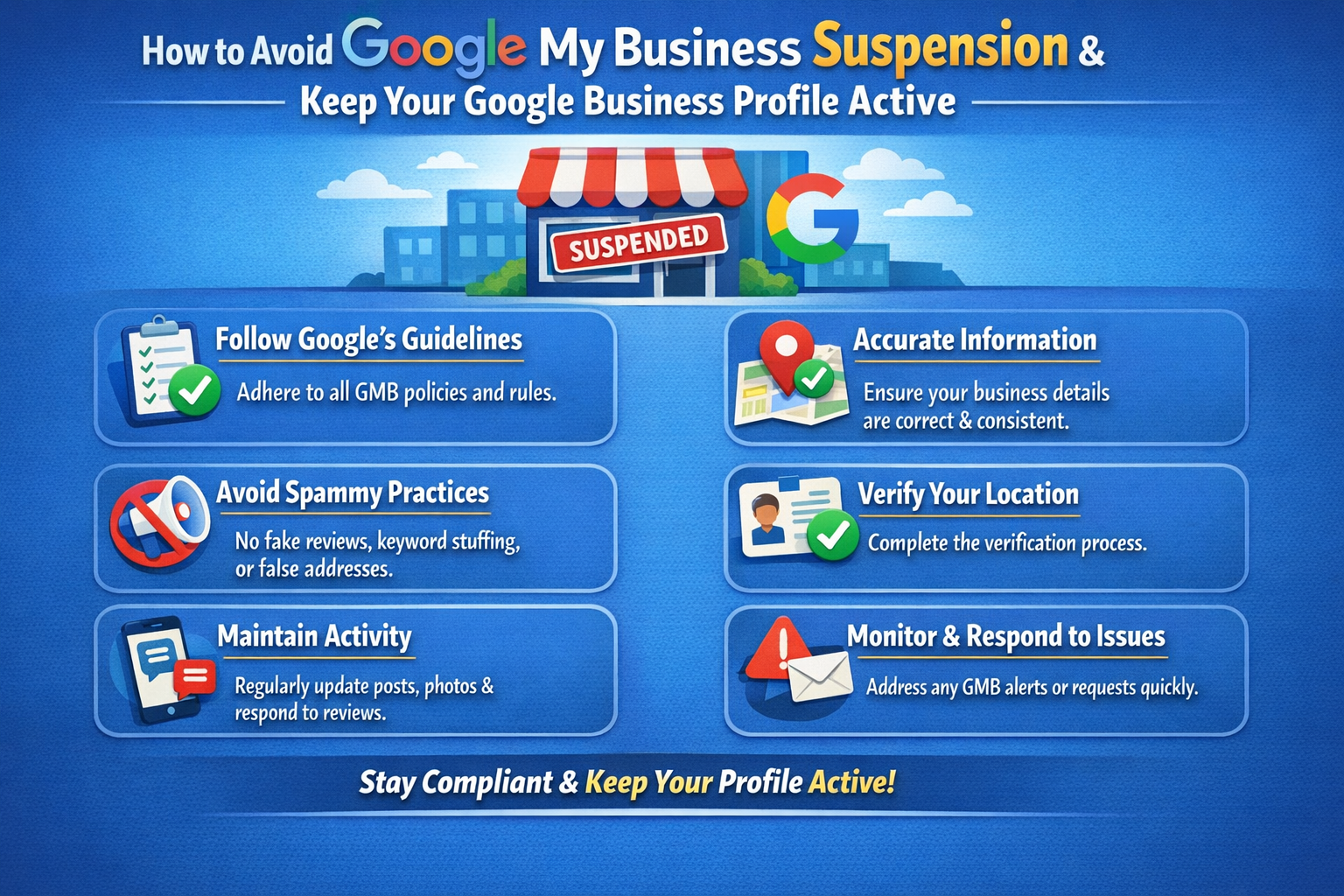
- Avoid fake reviews, spam activity, or review manipulation to protect your Google Maps ranking
- Verify your business properly to maintain Google business profile visibility
- Use correct business category and service areas for better local SEO optimization
- Regularly update your profile to improve Google Maps listing performance and search ranking
Recover Your Suspended Google My Business Account with Digital Entire – Digital Marketing Company Pune
Businesses often face problems like google has suspended my business page, google business listing suspended, or google business profile disabled, which directly affects online visibility, Google Maps ranking, and customer leads. To solve this, it is important to understand how the google business page will get suspend, fix all errors, and apply for reinstatement to remove google business account suspended status and make your listing active again.
At Digital Entire – Digital Marketing Company Pune, we help businesses recover suspended Google My Business accounts, fix google business profile suspended issues, and improve Google Maps ranking and local SEO performance. Our expert team ensures your listing follows all Google guidelines, helping you activate suspended Google business account, restore online visibility, and generate more leads for your business.google business listing suspended, verification, and optimization.
FAQs – Google My Business Suspended & Google Business Profile Suspension
1. How to recover suspended Google My Business account quickly?
To recover suspended Google My Business account, you must first identify the exact reason behind the google business profile suspended issue. This may include google business suspended due to quality issues, incorrect business information, fake address, or policy violations. After identifying the issue, fix all errors in your listing, ensure your business details are accurate, and then submit a Google Business Profile reinstatement request with proper documents. Following the correct process improves your chances of restoring your Google Maps listing and local SEO ranking quickly.
2. Why is my Google business listing suspended?
A google business listing suspended issue usually happens when your profile does not follow Google guidelines. Common reasons include NAP inconsistency, duplicate listings, keyword stuffing in business name, fake address, low-quality website, or spam activity. Google uses automated systems to detect such issues, and if your listing is flagged, it may be removed from Google Maps and local search results, affecting your online visibility and leads.
3. How to fix Google Business Profile suspended due to quality issues?
To fix google business suspended due to quality issues, you need to improve the overall quality of your profile. This includes adding complete business information, uploading real images, ensuring your website matches your listing, and removing any misleading or spam content. Maintaining NAP consistency and proper category selection also helps resolve Google Business Profile suspended errors and improves local SEO performance.
4. How long does it take to recover Google Business Profile in Pune, Maharashtra?
Recovering a google business profile suspended account in Pune usually takes 3 to 14 days, depending on verification by Google. In some cases, additional documents may be required for businesses in Maharashtra.
5. What documents are required to recover suspended Google My Business in Pune?
To fix google business account suspended in Pune, Maharashtra, you may need:
- Business registration proof
- Address proof (electricity bill, rent agreement)
- Shop or office photos in Pune location
- Website proof
These documents help verify your Google Maps business listing in Pune.
6. Can I create a new listing if my Google business is suspended?
No, creating a new listing instead of fixing your google my business suspended account is not recommended. This can lead to permanent suspension or additional penalties. Google may detect duplicate or spam listings, which can further harm your Google Maps visibility and local SEO ranking. It is always better to recover your original listing.
7. What is the difference between soft suspension and hard suspension?
A soft suspension means your google business listing is still visible on Google Maps but you cannot manage or edit it, while a hard suspension means your Google Business Profile is completely removed from search results and Google Maps. Understanding the difference helps in choosing the correct recovery approach for your google business suspended issue.
8. How to activate suspended Google business account in Pune, Maharashtra?
To activate suspended Google business account in Pune, fix all issues, follow Google guidelines, and submit a reinstatement request. Once approved, your business will be visible again on Google Maps Pune and local search results.
9. What causes Google business account suspended again after recovery?
Your google business account can get suspended again if you repeat the same mistakes such as incorrect business details, frequent profile changes, fake reviews, or policy violations. Maintaining accurate information, avoiding spam practices, and regularly updating your profile helps prevent repeated Google Business Profile suspension.
10. How to remove Google business account suspended status?
To remove google business account suspended status, you must fix all errors, follow Google guidelines, and submit a proper reinstatement request with valid documents. Once approved, your listing will be restored, improving your Google Maps visibility, local SEO ranking, and online business growth.